
 Custom system integration
 Embedded Redesign
 Board Support Package for System Houses


LVGL stands for Light and Versatile Graphics Library and is a lightweight graphics library for embedded GUIs. LVGL is particularly useful where the user interface, hardware and system integration need to be closely integrated — for example, in HMIs, touch interfaces, graphical overlays or streamlined user interfaces on MCU, MPU or Embedded Linux platforms.
For many embedded products, it is not the widest possible range of functions that is crucial, but rather the technical fit with the target system. This is precisely where LVGL comes into its own. In resource-sensitive architectures, with clearly defined user interfaces, and wherever a GUI should not be an unnecessarily heavy software component.
 Lean software architecture
 Platform-integrated
 Wide range of applications
 Well suited to product-oriented HMIs
The complete LVGL ecosystem
Today, LVGL is not only relevant as a traditional graphics library, but also as an ecosystem offering a range of options to suit different project requirements — from a freely available core library to specialised versions for more demanding development and deployment scenarios.


LVGL Safe
A completely rewritten version for safety-critical applications (e.g. medical, automotive, industrial).
Certifiable user interfaces in accordance with standards such as ASIL-B or SIL-2
Completely avoids dynamic memory allocation
Suitable for use in environments with extremely high safety requirements

LVGL is particularly useful when an embedded project has clearly defined requirements regarding the user interface, hardware and integration.
Typical areas of application include:
Embedded HMIs with clearly defined operating logic
Resource-constrained target systems where CPU and memory budgets are critical
Touch interfaces for operation, visualisation and parameterisation
Graphical overlays on top of data or video content
Systems in which hardware, GUI and system logic are closely coupled
Projects seeking an alternative to more comprehensive GUI stacks
Practical relevance: LVGL is also suitable for migrating and modernising existing applications
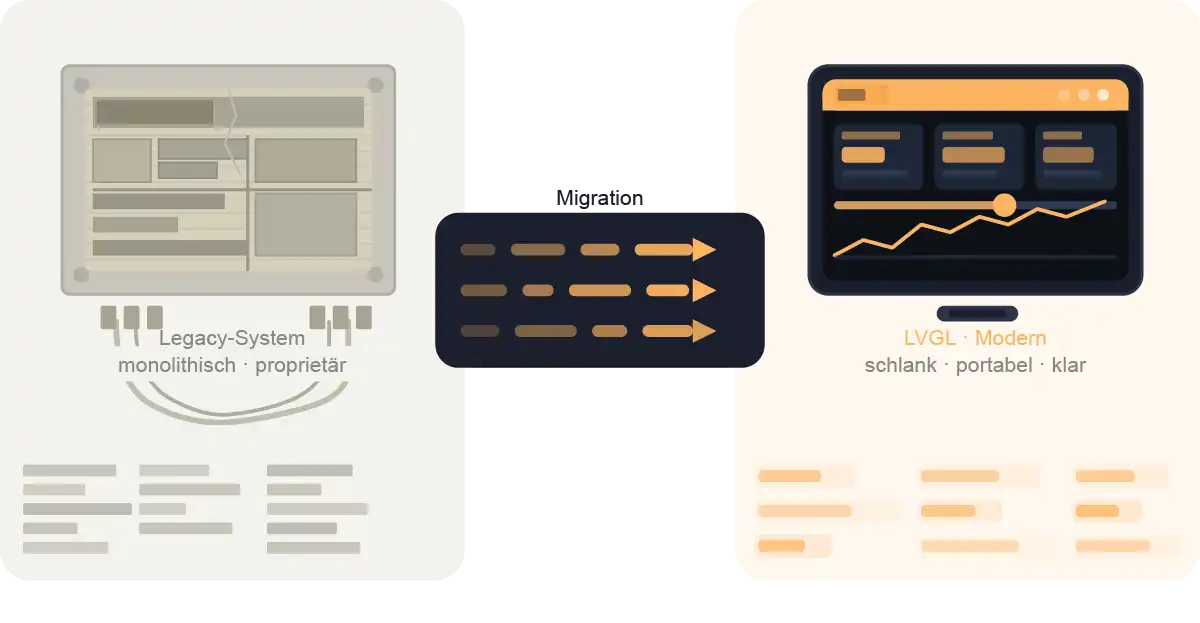
LVGL is not only of interest for new embedded projects. The technology can also be useful when existing applications need to be ported to modern platforms.
Background
Proven application running on end-of-life hardware and an older operating system.
Approach
Adapting the GUI into an LVGL-based application whilst retaining the business logic.
Objective
To migrate the user interface, functionality and familiar operating logic to a modern platform as seamlessly as possible.
Important:
Not every modernisation project requires a complete redesign of the user interface. If the look and feel and existing workflows are to be retained, LVGL can be a useful component in the technical migration process.
Live demo | LVGL on i.MX93 with low system load
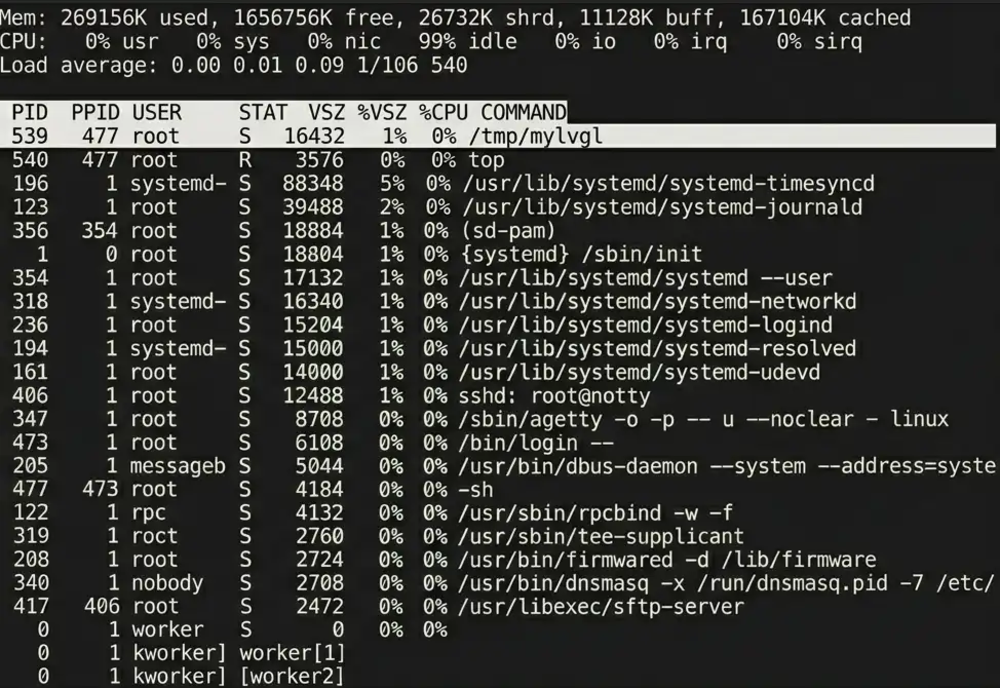
This demo shows a simple LVGL interface running on an i.MX93 system on chip, with the system load displayed below via `top`. It demonstrates just how seamlessly LVGL can be integrated in this scenario.
Key facts at a glance
- LVGL demo on i.MX93 running Linux — visible in the resource monitor as the process /tmp/mylvgl
- In the top screenshot shown, only minimal GUI load: mylvgl accounts for 1% of memory usage and 0% of CPU, whilst the CPU remains largely free with 99% idle
- Suitable for lightweight embedded HMIs, status displays or user interfaces where, in addition to the GUI, further application logic is to run on the same platform
Note:
The demo is not a universal benchmark, but rather a practical insight into LVGL’s resource profile on a real-world platform.
Live demo | Camera stream with LVGL overlay on i.MX6
The second demo shows LVGL working in conjunction with a camera stream and a graphical overlay on an i.MX6. This highlights not only the interface itself, but also its integration into a real-world embedded scenario.
Key facts at a glance
Camera stream with LVGL overlay on i.MX6 — the background stream is defined, the overlay contains a moving element
CPU load at around 18%, camera load at around 2% >> the i.MX6 handles the combination of video stream, overlay and data processing well
Optimised for cost-effective embedded camera systems, including overlays and control functions
Understanding LVGL, Qt and Qt for MCUs
Anyone searching for ‘LVGL’, ‘LVGL Qt’, ‘LVGL vs Qt’ or ‘Qt alternative’ is often referring to very different technical contexts. This is precisely why a clear distinction is important: classic Qt on embedded Linux, Qt for MCUs and LVGL take different approaches and are not directly interchangeable.
| Criterion | LVGL | Qt on Embedded Linux | Qt for MCUs |
|---|---|---|---|
| Target system | MCU, MPU, Embedded Linux | more powerful Linux-based systems | MCU / near-bare-metal targets |
| technical specifications | lightweight embedded graphics library | umfangreicheres Framework-Ökosystem | a more extensive framework ecosystem |
| typical focus | streamlined HMIs, overlays, hardware-based GUIs | more comprehensive Linux user interfaces | GUI on microcontroller targets |
| Licence / Pricing Model | Open-source foundation available, expandable depending on the project | cost-relevant depending on usage and licensing model | generally a commercial licensing framework |
| QML/UI approach | hardware-oriented GUI development | Qt Quick / QML im Linux-Kontext | Qt Quick / QML in a Linux environment |
| Resource profile | resource-efficient and platform-specific | depending on the Linux, graphics and framework stack | designed for MCU applications, but with reduced functionality |
| Tooling / Build | flexible in an embedded context | comprehensive Qt tooling in a Linux environment | specialised MCU workflow, bare-metal based on CMake |
| Classification | ideal for clearly structured embedded GUIs | useful if the Linux architecture is compatible | should not be equated with the full Qt |
Qt for MCUs: A Technical Review
Qt for MCUs is not the same as the full Qt framework. When evaluating it as an alternative or benchmark, it is particularly important to clearly understand the technical context within the MCU environment.
On microcontroller targets, it is not the full Qt framework that is used, but Qt Quick Ultralite (QUL). This approach is much more focused on the GUI than classic Qt.
Key differences:
- No standard libraries such as Qt Multimedia, Qt Network, Qt SQL or Qt WebEngine in the usual scope
- The focus is primarily on the user interface
- The classic QtWidgets module is not supported
In QML and Qt Quick, too, the MCU context is significantly more limited in terms of functionality than in the standard Qt environment.
These include, amongst other things:
- no dynamic QML objects at runtime as in the full Qt context
- limited use of JavaScript
- certain transformations and properties behave in a restricted manner
- individual value-type properties can only be written to directly to a limited extent
Qt for MCUs is designed for small target systems, but remains constrained by the limitations of the respective microcontroller.
Key considerations:
- without an RTOS, the application runs in single-threaded bare-metal mode
- additional graphics resources remain a significant factor in terms of memory and runtime
- standard I/O, as found on larger systems, is not available in the same form and must be implemented at a low-level hardware level
The development process for Qt for MCUs is also subject to different constraints than those of standard Qt.
Key points:
- In the MCU context, a commercial model is typically relevant
- Advanced debugging and profiling features may be limited
- Bare-metal projects are based on CMake, not qmake
Is LVGL the right choice for your project?
Whether LVGL, Qt, or another approach makes sense depends not on buzzwords, but on the technical reality of your system.

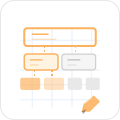
Understanding the Target System
We examine the platform, runtime environment, resource framework, and integration context

Evaluating LVGL Suitability
We assess whether LVGL is technically compatible with the desired GUI scope and system architectur
Define the GUI Architecture
Based on the requirements, the appropriate approach for integration and implementation is defined

Product-Specific Implementation
If needed, we provide support from the demonstration phase through adaptation or migration all the way to the final embedded GUI
This ensures that framework decisions are not based on gut feelings, but rather on a solid technical foundation for architecture, implementation, and future maintainability.
Yes, in certain embedded scenarios, LVGL can be a very good alternative to Qt—especially when resource requirements, hardware proximity, and a lean integration approach are the top priorities. However, LVGL is not a one-size-fits-all replacement.
Both are designed for embedded interfaces, but differ in terms of architecture, tooling, scope, and integration approach. It is particularly important not to confuse Qt for MCUs with the full Qt framework on Embedded Linux.
Yes. LVGL can also be effectively used in Linux-based embedded systems when a streamlined GUI design and direct integration into the target system are required.
Ideal for HMIs, touch interfaces, device controls, graphical overlays, and resource-sensitive embedded products with clearly defined UI logic.
Yes. LVGL can also be useful in migration and redesign projects when existing user logic needs to be preserved and an application must be ported to modern hardware or updated to the latest software versions.
Yes. We provide support for technical evaluation, architecture, development, porting, adaptation of existing applications, and integration of LVGL-based embedded GUIs.
Currently, LVGL can be broadly categorized into three versions: LVGL Open, LVGL Safe, and LVGL Pro.
LVGL Open is the classic MIT-licensed open-source library for embedded GUIs on MCU- and MPU-based systems.
LVGL Safe is designed for applications with higher requirements and, among other things, does not use dynamic memory allocation.
LVGL Pro extends the library with professional tools for UI workflows, such as design, testing, Figma import, and data binding
We will be happy to present solutions for your industry and your processes. Talk to the specialists for SMEs.
request now